
GSB Login — Sign In to Your Account
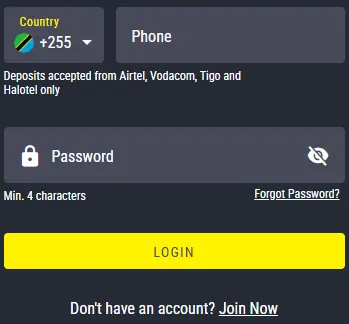
On the Swahili version of GSB, the login button reads Ingia rather than Login, everything else about signing in works exactly the same regardless of which language the interface is set to: a registered phone number, a password, and a confirm tap that lands on a dashboard covering both the casino and the sportsbook. There is no separate account for either side, one set of credentials is the entire point.
That single login matters more than it sounds. Slots, live tables, crash games and every sports market on GSB all draw from the same balance, so getting the login right the first time saves the annoyance of fighting a locked screen mid-session rather than mid-match.
GSB Login at a Glance
| Field | Detail |
|---|---|
| 📱 Credentials | Registered phone number and password |
| 🌐 Access Points | Website and the GSB app |
| 🇹🇿 Swahili Label | Ingia, same function as Login |
| 🔑 Forgot Password | SMS code to your registered number |
| 🔒 Locked Account | Temporary, after repeated failed attempts |
| 🆕 No Account Yet | Registration covered further down this page |
How to Sign In
- Open the GSB website or app on any device.
- Locate the login button, Login in English, Ingia on the Swahili interface.
- Enter your registered phone number and password.
- Confirm to submit.
- The dashboard loads within seconds, covering casino games and the sportsbook from the same screen.
Keep the browser or app updated where possible, an outdated version is one of the more common causes of a slow or failed login on older phones.
Creating an Account
New visitors need to register before any login works. The process is short: provide a phone number and set a password, confirm the number through an SMS code, then the account is active. A first deposit through mobile money activates both casino games and the GSB Sport betting markets together, since registration covers the whole platform rather than one product at a time.
Registration and the first login usually take under five minutes combined, most of that time is the SMS code arriving rather than any step being genuinely slow.
One Login Across Every Product
Once signed in, the same balance and profile cover slots, live dealer tables, crash games and full sports betting, pre-match and live. Nothing needs transferring between sections, a deposit made for a football accumulator works exactly as well on a roulette table five minutes later. The full detail of what sits inside the casino lobby is covered on the GSB homepage rather than repeated here, with the sportsbook broken down on its own page.
Password Recovery and Common Fixes
- Forgot your password. Choose the reset option on the login screen, enter your registered phone number, and follow the SMS code to set a new one.
- Password not accepted. Check for a capitalisation mismatch or a mistyped character before assuming anything else is wrong.
- Phone number rejected. Enter the number exactly as registered, including the country code if that was part of the original registration.
- Account not found. A second, unfinished registration attempt under a slightly different number is a common cause, double check which number was actually used.
- Page will not load. Clear the browser cache, switch from mobile data to Wi-Fi, or close and reopen the app.
- Account temporarily locked. Several failed attempts in a row trigger a short lock, wait a few minutes rather than repeating the same details.